
Preventive Maintenance Checklist for Managed IT Services Industry
2026-05-28
A preventive maintenance checklist for managed IT services industry helps businesses:
- Reduce unexpected downtime
- Improve IT asset performance
- Automate maintenance schedules
- Improve SLA compliance
- Monitor servers and networks
- Streamline ticket management
AntMyERP preventive maintenance software helps managed IT service providers automate inspections, track maintenance activities, and improve operational efficiency.
Managing IT systems for multiple clients is complex. Small issues like server downtime, failed backups, or network errors can quickly disrupt business operations. If these issues are not caught early, they can lead to costly downtime and customer complaints. Preventive maintenance helps IT teams detect and fix problems before they affect users, ensuring smooth and stable system performance.
Managing IT infrastructure for multiple clients is complex and requires continuous monitoring to avoid system failures. One day there can be a server issue, another day backup problems, and sometimes network complaints from customers. IT teams must continuously monitor systems to ensure smooth operations.
A hospital IT system goes down for 30 minutes. Patient records become unavailable, doctors cannot access reports, and treatment gets delayed. This shows why preventive maintenance in managed IT services is critical.
In this guide, you will learn:
- Why preventive maintenance matters in managed IT services
- Important maintenance checklist tasks
- Common challenges faced by IT businesses
- How preventive maintenance software improves operations
Why Preventive Maintenance Matters in Managed IT Services
A company server failing during working hours.One missed update can create a lot of problems in an office. Employees may suddenly lose access to files, support teams stop receiving customer requests, and the IT team starts checking systems in a hurry to find out what went wrong. Later they realize the problem started because a regular update was not done on time.
Many companies only react when something breaks instead of preventing issues in advance. In the beginning, IT teams manage things with spreadsheets, notes, or email reminders. But as more clients and systems get added, it becomes tough to keep track of everything.
That’s where a preventive maintenance checklist comes in. It helps teams stay organized, do regular checks on time, and reduce the chances of sudden system failures. Even a small downtime can slow down work and create a lot of pressure for both employees and customers.
What is Preventive Maintenance in Managed IT Services?
Preventive maintenance in managed IT services refers to regularly scheduled inspections, monitoring, updates, and servicing of IT systems before failures occur.This helps IT teams reduce downtime and improve system reliability across multiple client environments.
The process includes:
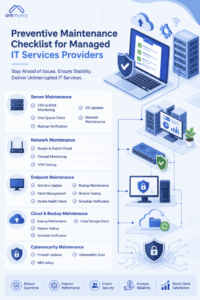
- Server maintenance
- Network monitoring
- Software updates
- Backup verification
- Endpoint management
- Cybersecurity maintenance
- IT asset tracking
The goal is to reduce downtime, improve system performance, and increase infrastructure reliability.
Server Maintenance Checklist for Managed IT Services
Server performance directly affects business operations. Regular server maintenance helps businesses avoid crashes and improve uptime.
Important Server Maintenance Tasks:
Monitor CPU and RAM Usage
High resource usage can slow down server performance and increase failure risks.
Check Disk Space
Low storage space can affect application performance and backup processes.
Verify Backup Completion
Regular backup verification ensures business data remains protected.
Update Operating Systems
Software updates improve security and system stability.
Review Server Logs
Server logs help technicians identify unusual activities and performance issues.
Monitor Cooling Systems
Overheating can damage server hardware and reduce lifespan.
Test Disaster Recovery Plans
Recovery testing ensures systems can recover quickly during failures.
Network Preventive Maintenance Checklist for IT Infrastructure
Network issues can interrupt entire business operations. Preventive network maintenance helps maintain stable connectivity and security.
Important Network Maintenance Tasks
Inspect Routers and Switches
Network hardware should be inspected regularly to avoid connectivity problems.
Monitor Firewall Performance
Firewall monitoring helps improve cybersecurity protection.
Review VPN Connectivity
VPN performance is important for remote employees and secure access.
Monitor Bandwidth Usage
Bandwidth monitoring helps identify unusual traffic patterns.
Verify Wireless Network Stability
Wi-Fi connectivity issues can affect employee productivity.
Scan for Network Threats
Regular network scans help detect suspicious activities early.
Endpoint Maintenance in Managed IT Services Checklist
Managed IT businesses often manage hundreds of laptops, desktops, and endpoint devices.
Regular endpoint maintenance improves performance and cybersecurity.
Endpoint Maintenance Tasks:
Install Security Updates
Software patches help fix vulnerabilities and improve stability.
Update Antivirus Programs
Updated antivirus software improves malware protection.
Remove Unused Applications
Unused software can slow down devices and create security risks.
Monitor Device Health
Regular monitoring helps detect hardware problems early.
Verify Endpoint Backups
Backup verification protects important business data.
Scan for Malware Threats
Routine malware scans improve endpoint security.
Backup Preventive Maintenance Checklist for IT Services
Many businesses discover backup failures only after losing important data.
Preventive maintenance helps ensure backup systems work correctly before emergencies happen.
Backup Maintenance Tasks
Test Backup Restoration
Testing ensures backups can recover data successfully.
Verify Backup Schedules
Regular schedule verification prevents missed backups.
Monitor Cloud Storage Usage
Cloud storage monitoring helps businesses manage capacity efficiently.
Review Recovery Objectives
Recovery planning helps reduce downtime during emergencies.
Check Backup Encryption
Encryption improves data protection and compliance.
Cybersecurity Preventive Maintenance Checklist
Cybersecurity maintenance is now a major part of managed IT services.
Without regular security monitoring, businesses become vulnerable to ransomware, phishing, and unauthorized access.Cybersecurity maintenance is now a major part of managed IT services. According to cybersecurity guidelines from CISA (Cybersecurity & Infrastructure Security Agency), regular security monitoring and updates are essential to prevent cyber threats.
Cybersecurity Maintenance Tasks
Update Firewall Rules
Firewall updates improve network security.
Review User Permissions
Permission reviews help prevent unauthorized access.
Perform Vulnerability Scans
Vulnerability scans identify security weaknesses early.
Enable Multi-Factor Authentication
MFA improves account protection.
Monitor Suspicious Login Attempts
Login monitoring helps identify cybersecurity threats quickly.
Common IT Maintenance Challenges in Managed Services
Many managed IT businesses struggle with:
- Missed maintenance schedules
- Manual maintenance tracking
- Poor asset visibility
- Emergency breakdowns
- Delayed ticket handling
- Limited reporting
As businesses grow, manual maintenance management becomes difficult.
A preventive maintenance checklist for the managed IT services industry helps businesses organize maintenance workflows and improve service efficiency.
Preventive Maintenance Software for Managed IT Services
Preventive maintenance software helps businesses automate maintenance operations and improve infrastructure management.
Automated Maintenance Scheduling
The software automatically creates recurring maintenance tasks and reminders using IT asset management software.
Centralized IT Asset Tracking
Businesses can track:
- Hardware assets
- Maintenance history
- Device warranties
- Asset locations
- Lifecycle status
Real-Time Alerts and Notifications
Technicians receive maintenance alerts before deadlines are missed.
Ticket Management Integration
Maintenance issues can automatically generate service tickets for faster resolution.
Reporting and Analytics
Analytics dashboards help businesses monitor:
- Downtime trends
- Asset performance
- Technician productivity
- SLA compliance
Why Businesses Choose AntMyERP’Preventive Maintenance Software
Managed IT service providers choose AntMyERP because it combines multiple service operations into one platform.
Key Features of PM Software
- Preventive maintenance management
- IT asset tracking
- AMC management
- Ticket management
- Field service management
- CRM
- Mobile technician access
- Reporting and analytics
The platform helps businesses automate maintenance operations, reduce downtime, and improve operational visibility.
What Changes After Using Preventive Maintenance Software
Before using this software, IT teams mostly use spreadsheets, emails, or manual notes to manage work. But sometimes things get missed, and small issues turn into bigger problems later. Then fixing them takes more time and can even cause downtime.
After using preventive maintenance software, things become much easier. Our CMMS software sends reminders, keeps all information in one place, and helps track everything properly. So no waiting is there if something breaks, teams can fix small issues early and keep systems running smoothly.
Conclusion
A preventive maintenance checklist helps IT companies make sure their systems don’t stop working suddenly.
It is like a daily reminder list for IT teams : check servers, update systems, and fix small issues before they become big problems.
Today, IT systems are big and complex, so doing everything manually becomes confusing and easy to miss. That’s why many companies use software to handle this work automatically.
With AntMyERP Preventive Maintenance Software, IT teams don’t need to remember everything. The software reminds them, tracks all systems, and helps them fix issues on time.
In simple words, it saves time, reduces system breakdowns, and makes IT work much easier.