
What Happens to Billing When a Rental Printer Is Replaced Mid-Month?
2026-09-23
Rental expiry management helps businesses track contract end dates, avoid missed renewals, prevent equipment from sitting unused, and reduce lost revenue. With rental management software, businesses can automate expiry reminders and follow up with customers on time.
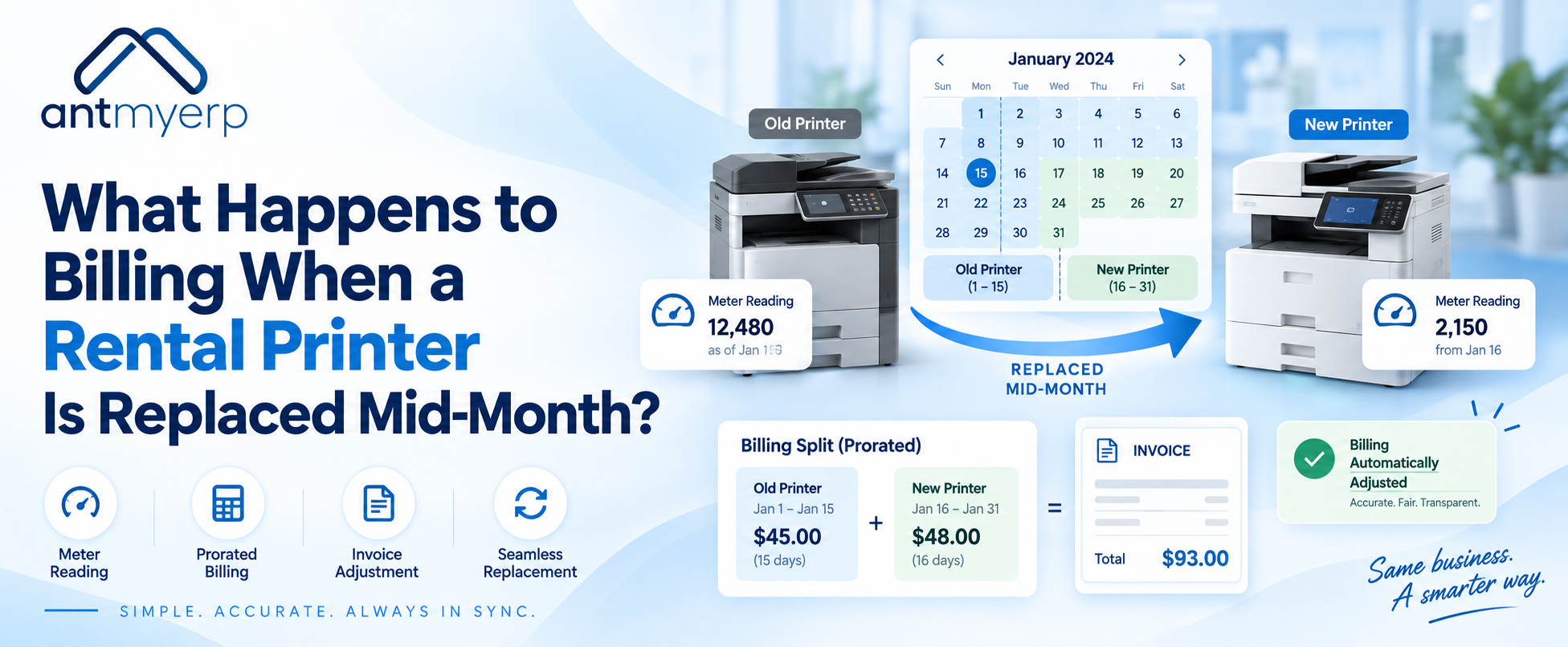
Replacing a rental printer in the middle of a billing cycle can create a common challenge for Managed Print Service providers. The customer may have used one printer for part of the month and a replacement printer for the remaining days.
So, how should rental printer billing be calculated?
The answer depends on the contract, rental charges, meter readings, and billing model. However, accurate billing usually requires the provider to record the old printer’s final meter reading and the replacement printer’s starting meter reading.
When these readings and replacement dates are properly recorded, businesses can calculate usage accurately and avoid billing disputes.
Why Printer Replacement Can Complicate Billing
A normal printer billing cycle is relatively straightforward.
The provider records the opening meter reading, captures the closing reading, calculates the number of pages printed, and applies the agreed billing rate.
For example:
Opening Meter: 20,000 pages
Closing Meter: 25,000 pages
Total Usage: 5,000 pages
But what happens when the printer is replaced on the 15th of the month?
Now there are two devices involved in the same billing period:
- Original printer
- Replacement printer
The billing team needs to know exactly when the first printer stopped being used and when the replacement printer started generating usage. This makes accurate printer meter billing important.
What Should Be Recorded When a Printer Is Replaced?
When a rental printer is replaced, the provider should record key information for both devices.
1. Final Meter Reading of the Old Printer
The old printer should have a final meter reading taken at the time of removal.
This establishes how many pages were printed while that device was active.
2. Replacement Date
The exact replacement date should be recorded.
This creates a clear cutoff between the old and new devices.
3. Starting Meter Reading of the New Printer
The replacement printer should have a starting meter reading recorded when it is installed.
If the replacement device has already printed pages before installation, those pages should be handled according to the contract and billing rules.
4. Device and Serial Number
The old and new printer should remain separately identifiable.
This helps connect meter readings to the correct customer, contract, device, and billing period.
5. Contract and Billing Details
The billing team should also confirm whether the customer’s contract charges:
- Monthly rental
- Per-page usage
- Toner
- Maintenance
- Minimum monthly volume
- A combination of these charges
Different contracts can have different billing rules.
Businesses managing service contracts can also use photocopier rental contract software to keep contract and billing information organized.
How Rental Printer Billing Works After a Mid-Month Replacement
Consider a simple example.
A customer has a printer with a monthly rental contract and per-page charges.
The original printer was replaced on September 15.
Original Printer
Opening meter on September 1: 10,000
Final meter on September 15: 13,000
Usage:
13,000 – 10,000 = 3,000 pages
Replacement Printer
Starting meter on September 15: 5,000
Closing meter on September 30: 7,500
Usage:
7,500 – 5,000 = 2,500 pages
Total Monthly Usage
3,000 + 2,500 = 5,500 pages
The billing system can then apply the customer’s agreed per-page rate to the combined usage.
This approach provides a clear record of usage across both devices.
Does the Monthly Rental Charge Need to Be Prorated?
This depends on the rental agreement.If the customer pays a fixed monthly rental charge, the contract may specify whether the charge remains unchanged when equipment is replaced.
For example, if the same contract continues and only the physical device changes, the provider may continue the normal monthly rental charge.
In other situations, the contract may require prorating the rental charge based on the number of days each device was active.
Therefore, rental printer billing should follow the commercial terms agreed with the customer rather than applying the same rule to every replacement.
What About Per-Page Billing?
Per-page billing is easier to reconcile when each device has clear meter readings.
The basic calculation is:
Usage = Closing Meter – Opening Meter
When a printer is replaced, the calculation becomes:
Old Printer Usage + Replacement Printer Usage = Total Billing Usage
This is why meter readings are an important part of managed print billing. Meter data helps providers track printer usage and support usage-based billing.
For MPS providers handling these calculations regularly, MPS billing software can help connect meter readings, billing rules, and invoice generation.
What Happens If the Old Printer’s Final Meter Reading Is Missing?
This is where manual billing can become difficult. Without the final meter reading, the provider may not know exactly how much the old printer was used before replacement.
The billing team may then have to:
- Contact the service team
- Check technician records
- Review device data
- Check previous meter readings
- Request information from the customer
- Apply an agreed estimation method if the contract permits it
Some MPS billing systems support estimated or no-read billing when an actual meter reading is unavailable, but the exact treatment depends on the system and contract rules.
A better process is to capture the final meter reading as part of the replacement workflow itself.
How Automated MPS Billing Can Handle Printer Replacement
For businesses managing many rental printers, manually tracking replacement dates and meter readings can become difficult.
A connected MPS billing software system can link:
- Customer
- Contract
- Old Printer
- Final Meter
- Replacement Printer
- Starting Meter
- Usage
- Invoice
This creates a clearer billing trail. Managed Print Services Software can help MPS providers manage meter readings, printer information, service activities, and automated invoicing within a connected workflow.
The system can also connect printer information with service operations, consumables, and customer records, helping MPS providers manage the broader workflow from one system.
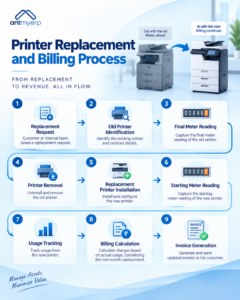
A Simple Printer Replacement Billing Workflow
A practical workflow can look like this:
- Replacement Request
- Old Printer Identification
- Final Meter Reading
- Printer Removal
- Replacement Printer Installation
- Starting Meter Reading
- Usage Tracking
- Billing Calculation
- Invoice Generation
Keeping these steps connected reduces the chance of missing important billing information.
For providers looking to improve printer service operations alongside billing, Printer Management Service Software can also support better coordination between service activities and printer management.
Common Billing Problems After Printer Replacement
Missing Final Meter Reading
If the old printer’s final meter is not recorded, usage may be difficult to calculate accurately.
Incorrect Replacement Date
An incorrect replacement date can cause usage to be assigned to the wrong billing period.
Wrong Device Linked to the Contract
If the replacement printer is not properly linked to the customer contract, its meter data may not reach the billing process.
Duplicate Billing
If both the old and replacement printer remain active in the billing system, the same customer may accidentally be billed for overlapping usage.
Manual Invoice Adjustments
When meter readings and replacement records are stored separately, finance teams may need to manually correct invoices.
How to Prevent Billing Errors During Printer Replacement
MPS providers can create a standard replacement checklist:
- Record the old printer’s serial number
- Capture the final meter reading
- Record the removal date
- Record the replacement printer’s serial number
- Capture the starting meter reading
- Link the replacement device to the correct customer and contract
- Confirm the billing rate
- Calculate usage for both devices
- Review the invoice before sending it
This creates a consistent process every time a printer is replaced.
Why Centralized MPS Billing Matters
Printer replacement is not only a service activity. It can also affect contracts, inventory, meter readings, customer records, and billing.
When these activities are managed separately, information can get lost between the service and finance teams.
A centralized Managed Print Services Software solution can connect device information, service activity, meter readings, contracts, and invoices. AntMyERP’s MPS solution is designed to connect meter readings with automated invoicing and other print-service workflows.
For MPS providers managing a large number of rental printers, this connected approach can make printer replacement billing easier to track and reconcile.
Final Takeaway
When a rental printer is replaced mid-month, billing does not necessarily need to become complicated.
The key is to maintain a clear record of:
- Old Printer Final Meter
- Replacement Printer Starting Meter
- Usage
- Replacement Date
- Contract Terms
With accurate meter readings and properly recorded device changes, MPS providers can calculate usage more clearly and reduce billing discrepancies.
For businesses managing multiple rental printers, automated printer meter billing and MPS billing software can connect device data with contracts and invoicing, making the replacement process easier to manage.
To see how AntMyERP can help manage MPS operations, meter readings, service workflows, and automated billing.