
Top Solar Business Management Software for Contractors
2026-10-31
Solar business management software helps contractors manage installation projects, technician schedules, inventory, work orders, customer requests, and maintenance activities. By organizing these workflows in one system or connected applications, solar businesses can reduce manual coordination, track job progress, improve material planning, and maintain equipment records. The right solution depends on whether a contractor focuses on solar installations, engineering, procurement and construction (EPC), field service, or ongoing asset maintenance.
What Is Solar Business Management Software?
Solar business management software helps solar contractors coordinate daily operations, from installation planning and job scheduling to inventory tracking, field service, and ongoing maintenance. It helps teams organize business information, monitor work progress, and make informed operational decisions.
For example, a solar contractor managing installations across several customer sites may need to schedule site visits, assign technicians, check equipment availability, track work orders, and arrange follow-up maintenance. When these activities rely on separate spreadsheets, phone calls, and messages, updates can be missed and work can be delayed.
With suitable software, the contractor can maintain job records, track assigned tasks, monitor stock availability, and access service histories through a more organized workflow.
The goal is to help solar businesses coordinate work more effectively, control operational costs, and provide consistent service throughout the equipment lifecycle.
Why Do Solar Contractors Need Business Management Software?
Solar contractors often manage several activities simultaneously, including site assessments, installations, equipment procurement, commissioning, repairs, and preventive maintenance. As the business grows, coordinating these activities manually becomes more difficult.
Common challenges include:
- Installation delays: Teams may not have the latest job status, site information, or material availability.
- Technician scheduling conflicts: Installation appointments and service visits may overlap.
- Inventory shortages: Missing panels, inverters, cables, or replacement components can delay jobs.
- Limited job visibility: Managers may struggle to identify projects that are delayed or awaiting approval.
- Untracked service requests: Customer complaints and repair requests can be missed across calls and messages.
- Maintenance gaps: Equipment inspections and recurring maintenance may not happen on schedule.
- Disconnected records: Project details, equipment information, service histories, and customer records may be stored in different systems.
Solar business management software helps contractors organize these workflows, improve coordination, and maintain more reliable operational records.
Top Solar Business Management Software for Contractors
The best solar business management software depends on the contractor’s business model, project complexity, team size, and service requirements. Compare the following software categories to identify which capabilities best match your business needs.
1. Integrated Service and Asset Management Software
Integrated service and asset management software helps contractors manage service requests, work orders, technician activities, equipment records, and ongoing maintenance.
AntMyERP offers solutions for field service management, inventory management, asset management, preventive maintenance, and AMC management. Solar contractors can evaluate Asset Management Software to determine whether its capabilities fit their equipment tracking and service management requirements.
Best for: Contractors managing installed equipment, service requests, repairs, and ongoing maintenance.
2. Solar Project Management Software
Solar project management software helps businesses organize project milestones, installation schedules, task assignments, documentation, and progress tracking.
It is particularly useful for installation companies and EPC contractors coordinating multiple projects, teams, and deadlines.
Key capabilities to evaluate: Project scheduling, milestone tracking, task assignments, document management, and progress reporting.
Best for: Solar contractors managing multiple installation projects.
3. Solar Field Service Software
Solar field service software helps managers schedule technicians, assign service jobs, coordinate dispatching, record field updates, and track job completion.
For example, when a customer reports an inverter issue, the service team can record the request, assign a technician, schedule a visit, and document the work performed. Available features depend on the software selected.
Explore Field Service Management Software to evaluate its relevance to your field service workflows.
Key capabilities to evaluate: Technician scheduling, dispatching, work order management, mobile access, and service history.
Best for: Contractors handling repairs, inspections, equipment servicing, and maintenance across multiple locations.
4. Solar Inventory Management Software
Solar inventory management software helps contractors maintain stock records, track material movements, and monitor the availability of solar panels, inverters, cables, and replacement parts.
Depending on the product, it may also support stock transfers, reorder alerts, and inventory reporting. Linking inventory records with installation jobs and service work orders can help teams identify material requirements more effectively.
Explore our Inventory Management to evaluate its inventory management capabilities.
Key capabilities to evaluate: Stock tracking, spare parts management, material movement, stock availability, and inventory reporting.
Best for: Contractors managing solar equipment, installation materials, and replacement parts.
5. Solar ERP Software
Solar ERP software aims to connect multiple business functions, potentially including procurement, inventory, finance, and operations.
Before choosing a solution, contractors should review the available modules, integration options, reporting capabilities, implementation requirements, and total cost.
Key capabilities to evaluate: Procurement, inventory management, financial workflows, operational reporting, and system integrations.
Best for: Growing solar businesses that need to coordinate multiple departments and business processes.
These software categories can overlap, and some solutions offer capabilities across several areas. Before making a decision, compare verified features, integration requirements, implementation costs, and support options. Request a demonstration using a real workflow from your business to confirm that the software meets your requirements.
Essential Features of Solar Business Management Software
Not every contractor needs the same features. Prioritize capabilities that address your current operational challenges.
1. Solar Project and Installation Management
Installation projects involve several stages, from site assessment to equipment installation, testing, and handover.
Solar project management capabilities help teams organize tasks, assign responsibilities, track milestones, and identify delays. Job records can also help managers understand which installations are completed, in progress, or awaiting materials.
Look for task assignments, status tracking, document management, and project reporting.
2. Solar Field Service and Technician Scheduling
After installation, contractors may need to handle inspections, breakdowns, performance concerns, and repair requests.
Solar field service software helps managers schedule visits, assign technicians, coordinate dispatching, and monitor job progress.
For example, when a customer reports an inverter issue, the service team can record the request, assign a technician, schedule a visit, and document the work performed. The exact workflow depends on the software.
3. Solar Inventory Management
Solar installations and repairs depend on the availability of the correct materials and replacement parts.
Solar inventory management software helps businesses maintain stock records, track material movements, and monitor availability. Depending on the product, it may also support stock transfers, reorder alerts, and inventory reporting.
Contractors should look for ways to connect material usage with installation jobs and service work orders. This helps teams understand where equipment has been allocated and which jobs are waiting for parts.
4. Solar Work Order Management
Work orders help contractors organize installation tasks, inspections, repairs, and maintenance activities.
Solar work order management software can record job details, assigned personnel, priorities, deadlines, status updates, and completion notes.
A clear work order process helps managers identify overdue jobs and gives technicians a consistent record of the work they need to perform.
5. Solar Preventive Maintenance Management
Solar equipment requires appropriate inspections and maintenance throughout its operating life. Activities may include visual inspections, cleaning where required, electrical checks, inverter inspections, and other manufacturer-recommended procedures.
Preventive maintenance software helps teams plan recurring activities, assign tasks, and maintain service records.
.
6. Solar Asset Management
Contractors and maintenance providers may manage equipment across multiple customer sites. Without reliable records, identifying an asset’s service history or previous repairs can take time.
Solar asset management capabilities can help maintain equipment identifiers, locations, installation details, warranty information, inspection records, and maintenance history, depending on the system.
These records help teams plan service activities and understand the history of individual assets.
7. Solar Contract and Service Ticket Management
Solar contractors may manage installation agreements, maintenance contracts, warranty-related requests, and recurring service commitments.
Contract management capabilities help teams organize contract records, responsibilities, and renewal dates. Service ticket management helps record customer issues, assign ownership, and track resolution.
Check whether the software supports contract-linked service requests, service-level tracking, and notifications relevant to your business.
Common Solar Contractor Problems and How Software Helps
Problem 1: Installation Delays
When project updates are scattered across spreadsheets and messages, teams may not know which tasks are complete or which materials are still required.
Solution: Centralized job records and project status updates help managers monitor progress and identify pending tasks. This can improve coordination between project managers, technicians, and procurement teams.
Problem 2: Technician Scheduling Conflicts
A technician may be assigned to two jobs at the same time, or a service visit may be scheduled without considering travel and job requirements.
Solution: Technician Mobile Apps help managers coordinate appointments, assign technicians, and track job status. The availability of route planning and automated scheduling depends on the software.
Problem 3: Inventory Shortages
Installation work can be delayed when required panels, inverters, cables, or spare parts are unavailable at the right location.
Solution: Inventory tracking helps teams monitor stock availability, record material movements, and plan allocation. Stock alerts and reorder suggestions may be available depending on the product.
Problem 4: Missed Customer Service Requests
When customers report problems through multiple channels, requests may be overlooked or assigned without clear ownership.
Solution: Centralized service tickets help teams record requests, assign responsibility, set priorities, and monitor resolution.
Problem 5: Missed Maintenance Activities
Without a structured schedule, recurring inspections and maintenance tasks may be delayed or forgotten.
Solution: Preventive maintenance scheduling, reminders, and work order records help teams organize recurring activities and maintain service histories.
Problem 6: Limited Equipment History
Technicians may waste time searching for installation details, previous repair notes, warranty information, or inspection records.
Solution: Asset management software can centralize equipment records and service history, helping technicians prepare for visits and managers plan maintenance.
How to Choose the Right Solar Contractor Software
Choosing software based only on its feature list can lead to unnecessary costs or operational gaps. Start by identifying the workflows that cause the most delays or require the most manual effort.
Step 1: Identify Your Business Model
Determine whether your business primarily handles residential installations, commercial and industrial projects, EPC contracts, equipment leasing, or long-term maintenance.
Installation-focused contractors may prioritize project tracking and materials planning. Service providers may need technician scheduling, work orders, service tickets, and maintenance records.
Step 2: Map Your Current Workflow
Document how a job moves from the initial customer request to completion. Include scheduling, approvals, material allocation, field execution, reporting, and billing where applicable.
This helps identify which processes need better coordination or automation.
Step 3: Check the Required Features
Evaluate project tracking, inventory, field service, asset management, contract records, and reporting against your actual requirements.
Do not assume a product supports solar-specific design, engineering, performance monitoring, or financial functions simply because it is marketed to contractors.
Step 4: Evaluate Integration and Mobile Access
Field teams may need to access job details, update work orders, and record service notes while visiting customer sites.
Check mobile usability, connectivity requirements, integration options, permissions, and data synchronization.
Step 5: Compare Total Cost and Expected Value
Consider subscription fees, implementation, training, integrations, data migration, and ongoing support.
Estimate the time saved and operational costs that could realistically be reduced. Use your own historical data rather than relying only on vendor-provided ROI claims.
Step 6: Run a Practical Demonstration
Ask vendors to demonstrate a real workflow, such as receiving a service request, assigning a technician, checking parts availability, completing the work order, and updating the equipment’s service history.
A workflow-based demonstration is often more useful than a general product presentation.
Comparing Solar Business Management Software Options
Different software categories solve different operational problems. Use the following points to compare options.
Project Management Software
- Main focus: Project milestones, tasks, deadlines, and installation progress.
- Consider it when: Coordinating installation projects is the main challenge.
- Check before buying: Field service, inventory, and asset management capabilities may be limited or require integrations.
Field Service Software
- Main focus: Technician scheduling, dispatching, service requests, and field jobs.
- Consider it when: Repair and maintenance coordination is a priority.
- Check before buying: Confirm support for inventory, contract records, and recurring maintenance if needed.
Inventory Management Software
- Main focus: Stock levels, material movement, and spare parts.
- Consider it when: Material availability and inventory accuracy are recurring issues.
- Check before buying: Confirm whether stock can be linked to projects, technicians, and work orders.
Solar ERP Software
- Main focus: Connecting business functions such as procurement, finance, inventory, and operations, depending on available modules.
- Consider it when: The business needs broader operational and administrative integration.
- Check before buying: Verify implementation costs, required modules, reporting, and the complexity of the system.
Integrated Service and Asset Management Software
- Main focus: Connecting service requests, work orders, asset records, and maintenance workflows where supported.
- Consider it when: The business manages installed equipment and ongoing customer service.
- Check before buying: Confirm that the product covers the installation, inventory, and project workflows your business actually needs.
The best choice is the one that fits your workflow, supports your team, and offers measurable value without unnecessary complexity.
ROI Example: How Solar Business Management Software Can Reduce Operational Costs
Consider a hypothetical solar contractor with 10 field technicians. Each technician spends around 30 minutes per working day on avoidable administrative tasks, such as chasing job updates, checking assignments, or manually updating records.
Assume the company operates 22 working days per month and uses an internal labor cost of Rs. 300 per hour.
Step 1: Calculate the time saved
- Number of technicians: 10
- Time saved per technician daily: 30 minutes, or 0.5 hours
- Working days per month: 22
- Total monthly hours saved: 10 × 0.5 × 22 = 110 hours
Step 2: Estimate the value of recovered time
- Assumed labor cost: Rs. 300 per hour
- Monthly labor capacity value: 110 × Rs. 300 = Rs. 33,000
Step 3: Subtract the assumed software cost
- Illustrative monthly software cost: Rs. 15,000
- Potential monthly net value: Rs. 33,000 − Rs.15,000 = Rs. 18,000
Under these assumptions, the contractor could recover 110 hours of staff capacity each month, representing Rs. 33,000 in labor capacity value. After the assumed software cost, the illustrative net value is Rs. 18,000 per month.
These figures are hypothetical, not guaranteed savings. Time saved does not automatically translate into cash savings. The business must use the recovered capacity productively or reduce actual expenses for the financial benefit to be realized. Implementation, training, integrations, and other costs should also be included in a complete ROI calculation.
Other potential improvements, such as fewer repeat visits and reduced inventory-related delays, should be measured separately using actual business data.
Benefits of Using Solar Business Management Software
When the selected software fits the business and is used consistently, it can support several operational improvements.
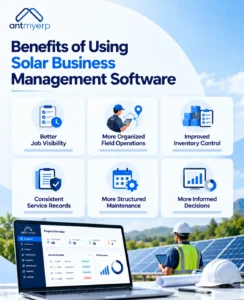
Better job visibility: Managers can review job statuses, assignments, and outstanding tasks without relying entirely on manual updates.
More organized field operations: Scheduling and work order records help teams coordinate appointments and responsibilities.
Improved inventory control: More reliable stock records can help identify shortages and plan material allocation.
Consistent service records: Service tickets and asset histories make it easier to review previous issues and work performed.
More structured maintenance: Recurring schedules and task records help teams plan preventive maintenance.
More informed decisions: Operational reports can help managers identify recurring delays, workload imbalances, and process bottlenecks.
Actual results depend on implementation quality, data accuracy, workflow design, and employee adoption.
Solar contractors need to coordinate installation projects, field teams, materials, service requests, and equipment maintenance without losing visibility into daily operations. Solar business management software can help organize these activities and reduce dependence on disconnected spreadsheets and manual updates.
Before selecting a solution, identify your most time-consuming workflows, compare relevant features, evaluate integration requirements, and calculate potential value using your own operational data.
For businesses seeking to connect service and asset workflows, evaluate AntMyERP against your specific requirements and confirm the capabilities needed for your solar operations.
Conclusion
Solar contractors need to coordinate installation projects, field teams, materials, service requests, and equipment maintenance while maintaining visibility into daily operations. Solar business management software helps organize these activities, reduce manual coordination, and improve operational efficiency.
Before choosing a solution, identify your most time-consuming workflows, compare essential features, evaluate integration requirements, and calculate potential ROI using your business data.
AntMyERP offers software solutions for field service management, inventory management, asset management, preventive maintenance, and AMC management. Solar contractors can explore these capabilities to determine whether they meet their installation support, service, and maintenance requirements.